













Table of Content

For high-volume ecommerce stores, site performance can have a measurable impact on engagement and conversion. As catalogs, integrations, and traffic grow, however, maintaining a fast WooCommerce storefront can become increasingly complex.
When conventional optimization is no longer enough, some brands consider a more fundamental architectural change. This is where the decision to go headless becomes relevant.
Going headless with Next.js can give your team more control over rendering, caching, JavaScript delivery, and frontend architecture. But headless does not automatically make a store faster. Performance still depends on implementation, API architecture, caching, hosting, image optimization, third-party scripts, and the complexity of the storefront.
This guide provides a practical decision framework for implementing Headless WooCommerce with Next.js, including the technical considerations, migration requirements, and total cost of ownership.
What is Headless WooCommerce?
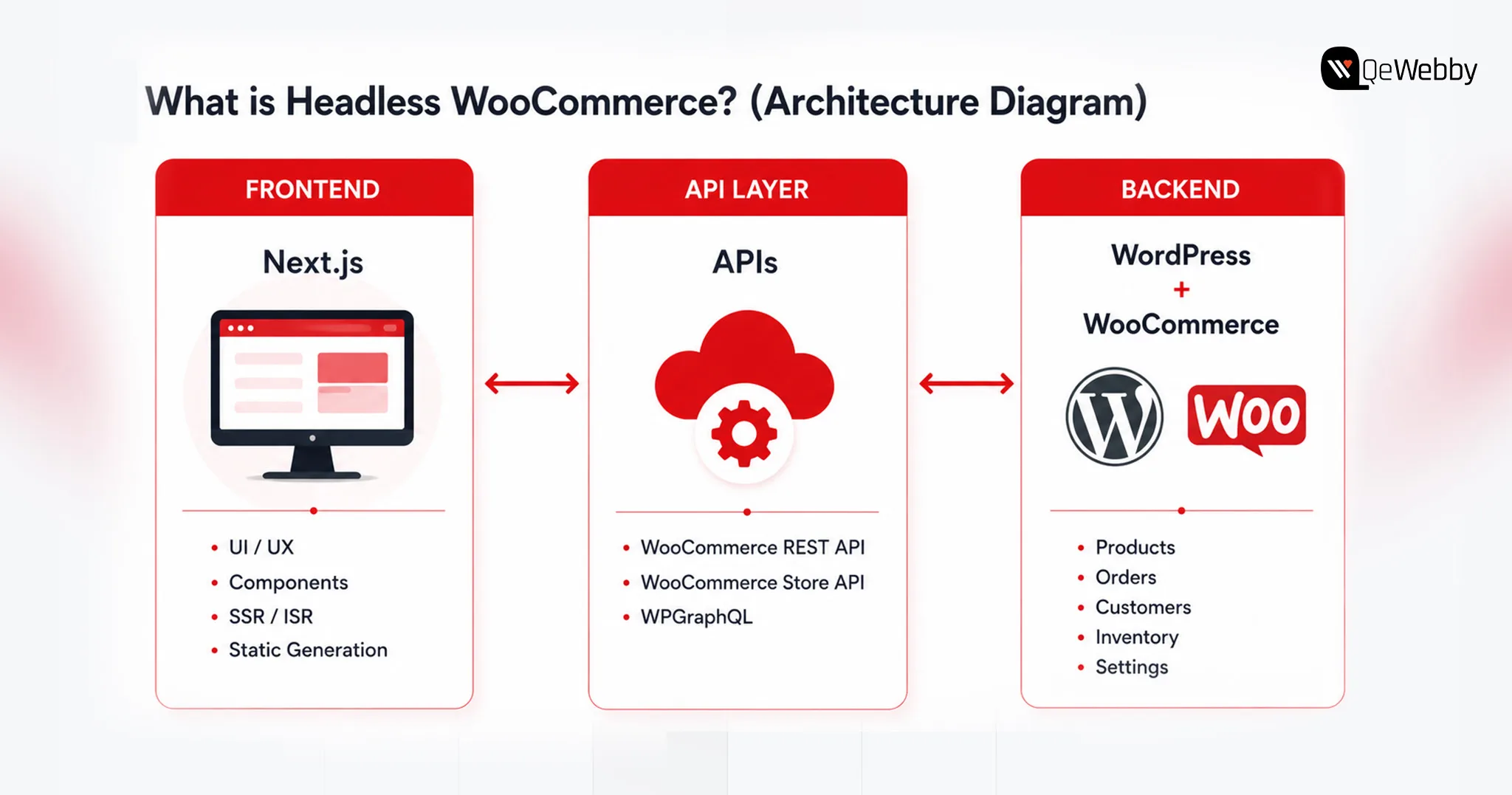
Headless WooCommerce separates the customer-facing frontend from the WordPress/WooCommerce backend, allowing the two layers to evolve independently while communicating through APIs.
In a conventional WooCommerce setup, WordPress operates as the monolith. It manages the database and uses PHP-based themes to generate HTML and visual design.
This decoupled system has three distinct layers,
- Backend as the engine - Your WordPress and WooCommerce installations continue to manage the core commerce operations, including product catalogs, inventory, pricing, taxes, shipping, customers, and orders. Your team can continue using the familiar WordPress admin interface while the customer-facing frontend is handled separately.
- Frontend as the experience you serve- With Next.js, your customer-facing storefront will be transformed, offering a modern, high-performance experience. With JavaScript at its core, Next.js offers higher flexibility for frontend development, and with the backend being decoupled, you can use edge-rendering content delivery networks.
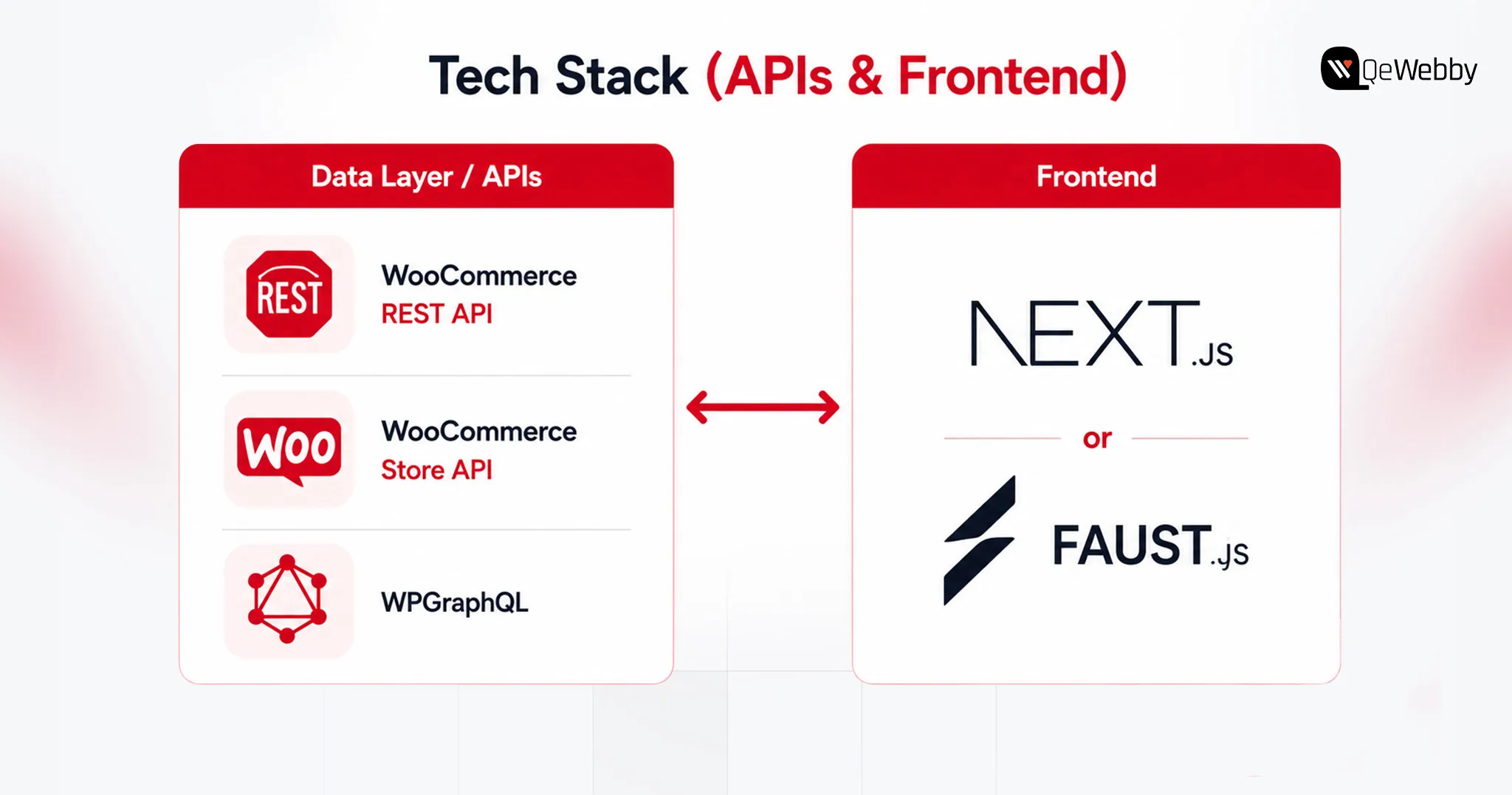
- API Layer as the bridge between frontend and backend- APIs help your frontend and backend communicate while they are decoupled. You can leverage endpoints like WooCommerce REST API, the WooCommerce Store API, or WPGraphQL. These APIs allow the frontend to request the data it needs while keeping business logic and sensitive backend operations within the appropriate server-side environment.
Using headless WooCommerce with Next.js removes many of the frontend constraints associated with conventional WordPress themes. This moves much of the customer-facing rendering work away from the traditional PHP theme layer, giving developers more control over frontend performance and architecture.
The important question is not whether headless is technically possible, but whether its benefits justify the additional development and maintenance complexity for your store.
Why Stores Are Going Headless: The Performance & Revenue Case
The case for headless is broader than page speed. For some ecommerce brands, the real value is frontend flexibility, faster experimentation, omnichannel delivery, and greater control over how content and commerce experiences are built.
Headless WooCommerce can give development teams greater flexibility when building new storefront features, experiences, and integrations. Better page performance can support user experience and Core Web Vitals, which are among the signals Google uses in evaluating page experience. However, moving to headless does not automatically improve search rankings.
And using headless WooCommerce with Next.js, brands can,
Get Speed Gains
WooCommerce’s monolithic architecture generally makes conventional online stores unnecessarily fat, and prevents easy “tree-shaking” or code-splitting of plugin scripts. What this means for an eCommerce brand is higher loading time, which impacts user experience and conversions. However, with Next.js you can ensure,
What Next.js can improve:
- More control over server-side rendering and static generation
- More granular caching and CDN delivery
- Reduced dependence on PHP theme rendering for the storefront
- Better control over JavaScript bundles and component loading
- More control over the factors that influence Core Web Vitals
- Greater freedom to build custom shopping experiences

Conversion + SEO impact
Google’s Core Web Vitals directly connect the three dimensions of loading speed, interactivity, and visual stability with search engine rankings and customer behavior. The money impact of meeting these metrics is tremendous, not just in SEO. Deloitte’s research across 37 brands found that a 0.1-second improvement in mobile site speed was associated with an 8.4% increase in retail conversions and a 9.2% increase in average order value.
SSR and ISR can make important page content available as rendered HTML while giving developers greater control over metadata, structured data, internal linking, and page performance. However, headless architecture itself does not guarantee better SEO; implementation still matters.
The Headless-Commerce Market Signal
Headless commerce has become increasingly common among larger brands that need highly customized digital experiences, multiple customer touchpoints, or greater control over their frontend architecture.
Headless commerce has become more common among larger brands that need highly customized digital experiences across multiple channels. However, the architecture used by enterprise brands should not automatically be treated as the right architecture for a mid-market WooCommerce store.
Decoupling can reduce the amount of frontend rendering work handled by the WordPress theme layer and can provide more flexibility around caching and content delivery. However, checkout, cart operations, APIs, and backend transactions can still become bottlenecks under load.
How Much Does Headless WooCommerce Cost? (2026 Budgets)

Typical Project Ranges
A typical WooCommerce implementation may fall in the $5,000–$30,000 range, depending on design, functionality, integrations, and customization.
Headless Next.js implementations typically require a larger initial investment because they introduce separate frontend development, API integration, testing, infrastructure, and ongoing maintenance requirements.
These are planning ranges rather than fixed market rates. Actual costs vary significantly based on catalog size, design requirements, integrations, plugin replacements, checkout complexity, migration scope, content modeling, and engineering location.
| Cost Consideration | Standard WooCommerce | Headless Next.js |
|---|---|---|
| Initial build | $5,000 – $30,000 | $60,000 – $150,000+ |
| Hosting | $100 – $300/mo | $300 – $1,000+/mo |
| Maintenance | Lower | Higher |
| DevOps | Usually limited | Often required |
| Plugin redevelopment | Lower | Potentially significant |
| TCO | Highly variable | Highly variable |
What Drives the Number
Timeline is the biggest lever, 14–22 weeks versus 8, and labor cost scales with it. Frontend-dependent plugins such as wishlists, loyalty programs, product customizers, and certain membership features may require API integration or frontend redevelopment in a headless setup. Each gets rebuilt in React or Next.js, alongside custom cart state and payment tokenization logic.
Large catalogs add weight too, mapping custom fields into GraphQL fragments and building webhook-based cache invalidation so inventory and pricing stay accurate without forcing a full site rebuild.
Build vs. Partner
A single change can touch WordPress, the API layer, and the frontend at once, demanding dual PHP and React/Next.js expertise. Specialized engineers with WooCommerce/PHP, React/Next.js, API, and DevOps experience can be expensive to hire and difficult to keep fully utilized if headless work is intermittent. Troubleshooting gets harder too, since a bug can originate in any of the three layers.
For organizations without the required internal expertise, working with a headless WordPress agency can reduce the burden of building and maintaining the architecture internally.
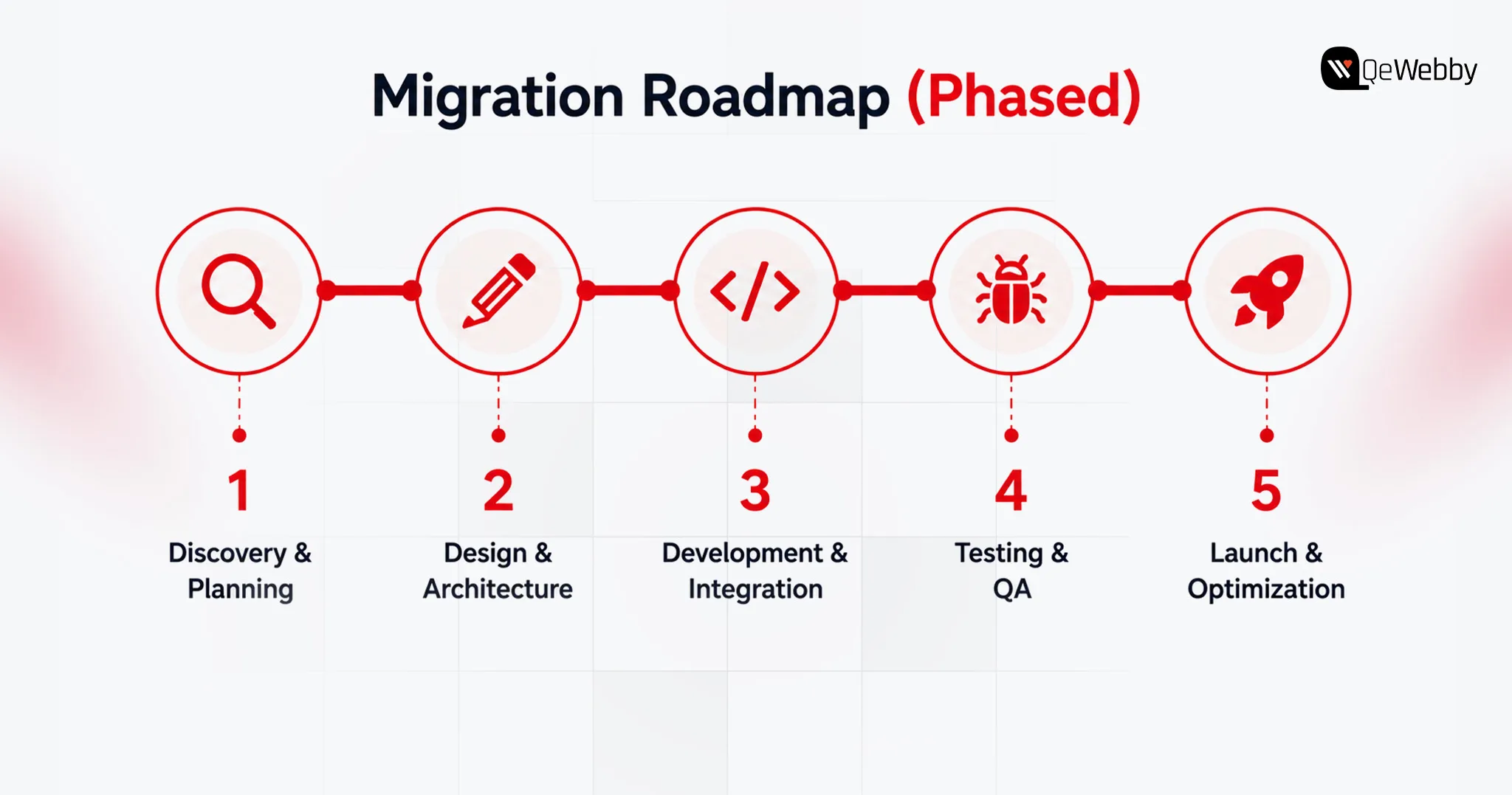
How to Actually Build It: Stack & Migration Roadmap
Building headless WooCommerce means replacing the traditional customer-facing WordPress theme with a separate Next.js frontend that communicates with WooCommerce through APIs.
Here’s how the stack and migration typically shake out.
Pick The Data Layer (REST vs WPGraphQL)
- REST API (v3): Authenticated REST API requests should not expose consumer secrets in the browser. Server-side requests or a secure backend layer should handle credentials when authentication is required.
- Store API: The Store API is designed for customer-facing cart and checkout interactions and uses WooCommerce's session mechanisms rather than requiring the same credential model as authenticated REST API requests.
- WPGraphQL: WPGraphQL provides the WordPress GraphQL layer, while WooGraphQL exposes WooCommerce-specific data through GraphQL. ACF can then expose structured custom fields when the content model requires them.
Choose the Frontend Framework (raw Next.js vs Faust.js)
- Raw Next.js: Full control over SSR, ISR, and architecture, but you hand-build the Apollo client and GraphQL queries yourself. Leaner dependency tree, more upfront engineering.
- Faust.js: Faust.js is a WordPress-focused framework built on Next.js that provides conventions and tooling for common headless WordPress requirements. It can reduce setup work, although teams should evaluate its current ecosystem and fit against a more custom Next.js architecture before choosing it.
Cart, checkout, SEO, and previews
PHP session cookies don’t survive a cross-domain frontend, so Cart state can be managed through WooCommerce’s Store API, including its cart-token mechanism, or through a solution such as CoCart. The implementation determines how sessions or cart tokens are persisted and passed between the frontend and WooCommerce.
For checkout, redirecting to WooCommerce’s native checkout is the most reliable path; a fully custom headless checkout with client-side tokenization (Stripe, for example) works too, but demands real API development.
SSR and ISR can mitigate some SEO and rendering challenges associated with client-heavy JavaScript by making important content available as server-rendered HTML.
Bridge Yoast or Rank Math metadata through GraphQL and rebuild schema markup on the frontend to keep it intact. For editors, Next.js Draft Mode plus a WordPress-minted JWT preview token lets them view unpublished drafts without exposing them publicly.
Phased Migration and Testing
Elementor, Divi, and similar page builders often store presentation-specific structures that do not map directly to a Next.js component system. During migration, those layouts may need to be extracted, modeled, and rebuilt as React components or structured content blocks.
SEO Migration and URL Mapping
Before launch, map every existing URL to its corresponding new URL. Implement 301 redirects where URLs change, preserve metadata and canonical tags, regenerate XML sitemaps, and crawl the staging environment for broken internal links and missing pages. Monitor Search Console after launch for indexing and coverage issues.
Here are a few points to consider when deciding between Headless WooCommerce, Traditional WooCommerce, and Shopify Headless.
Headless WooCommerce vs Traditional WooCommerce vs Shopify Headless (Decision Matrix)
Compare on speed, cost, control, maintenance, best-fit store size
The Shopify Headless column reflects standard enterprise SaaS benchmarks and the rent-vs-own tradeoff, since the underlying data focuses on WooCommerce and Next.js.
| Factor | Traditional WooCommerce | Headless WooCommerce (Next.js) | Shopify Headless (Enterprise SaaS) |
|---|---|---|---|
| Frontend performance control | Moderate | High | High |
| Backend ownership | High | High | Lower |
| Initial cost | Lower | High | High |
| Maintenance | Lower | Higher | Moderate |
| Plugin compatibility | Highest | Requires evaluation/rebuild | App/API dependent |
| Backend infrastructure | Self-managed | Self-managed | Platform-managed |
| Checkout complexity | Lower | Higher | Moderate–High |
| Custom frontend freedom | Moderate | Very high | Very high |
| Infrastructure responsibility | Lower | Higher | Lower |
| Best fit | Most stores | Complex/highly customized stores | Enterprise brands wanting SaaS infrastructure |
Conclusion
Go headless if:
- Your existing frontend architecture is limiting growth
- You need highly customized experiences
- You have engineering resources
- Your integrations justify API-first architecture
- You can support higher TCO
Stay traditional if:
- Your current store performs well
- Your plugin ecosystem is important
- You need to launch quickly
- Your team lacks React/API/DevOps expertise
- Headless doesn't solve a clearly measurable business problem
adminqewe