












Table of Content

The honest answer? It depends on one thing: whether you need a content management system.
If you’re building a static portfolio, a landing page, or a microsite that rarely changes raw HTML is faster, lighter, and simpler. No database, no plugins, no updates to manage.
If you’re publishing blog posts, managing a product catalog, or running a site that other people need to edit WordPress wins. The flexibility, ecosystem, and CMS features justify the added complexity.
Here’s the full breakdown so you can decide in under 5 minutes.
Why the WordPress vs HTML Decision Still Matters
To make a confident decision in the WordPress vs HTML discussion, it’s important to understand what each technology is built for and where it performs best. While both can power successful websites, they solve very different problems and support different growth paths.
That’s why understanding how each platform behaves in real business scenarios is critical.
What Is WordPress?
WordPress is a content management system designed to simplify website creation and ongoing management. It allows users to build and update websites without writing code, which is why it powers a significant portion of the web today. From blogs and corporate websites to complex eCommerce platforms, WordPress adapts easily as business needs evolve.
Its strength lies in flexibility. Themes control the visual layout, while plugins extend functionality, enabling features like SEO tools, forms, analytics, and integrations without custom development. This dynamic nature is a key factor in WordPress vs HTML websites, especially for businesses that publish content frequently or rely on user interaction.
- Did you know ? WordPress captures approximately 64% of the market, far ahead of competitors like Shopify, Joomla, or Wix.
1. Ideal Use Cases for WordPress
2. Popular Brands Using WordPress
-
If you're planning to upgrade, see what's new in WordPress 7.0 for a detailed breakdown of the latest features, performance improvements, compatibility changes, and upgrade considerations before updating your site.

What Is HTML?
HTML, or Hypertext Markup Language, is the core building block of the web. It’s used to create static web pages where content is manually coded and doesn’t change unless the source code is updated. Unlike WordPress, HTML websites don’t depend on databases or backend systems.
This simplicity brings performance benefits. Static HTML sites are typically faster, lighter, and less vulnerable to security threats. In comparison of WordPress vs HTML websites, HTML stands out for control and efficiency, especially when content remains consistent.
1. Static vs Dynamic Websites
2. Use Cases Where HTML Is Preferable
3. Popular Brands Using HTML
Several high-performance and design-focused brands rely heavily on HTML for specific parts of their web presence. Companies like GitHub (documentation pages), Dropbox (landing pages), Stripe (marketing pages), and Apple (product showcases) use static HTML to deliver speed, consistency, and flawless user experiences.
WordPress vs HTML: Side-by-Side Comparison
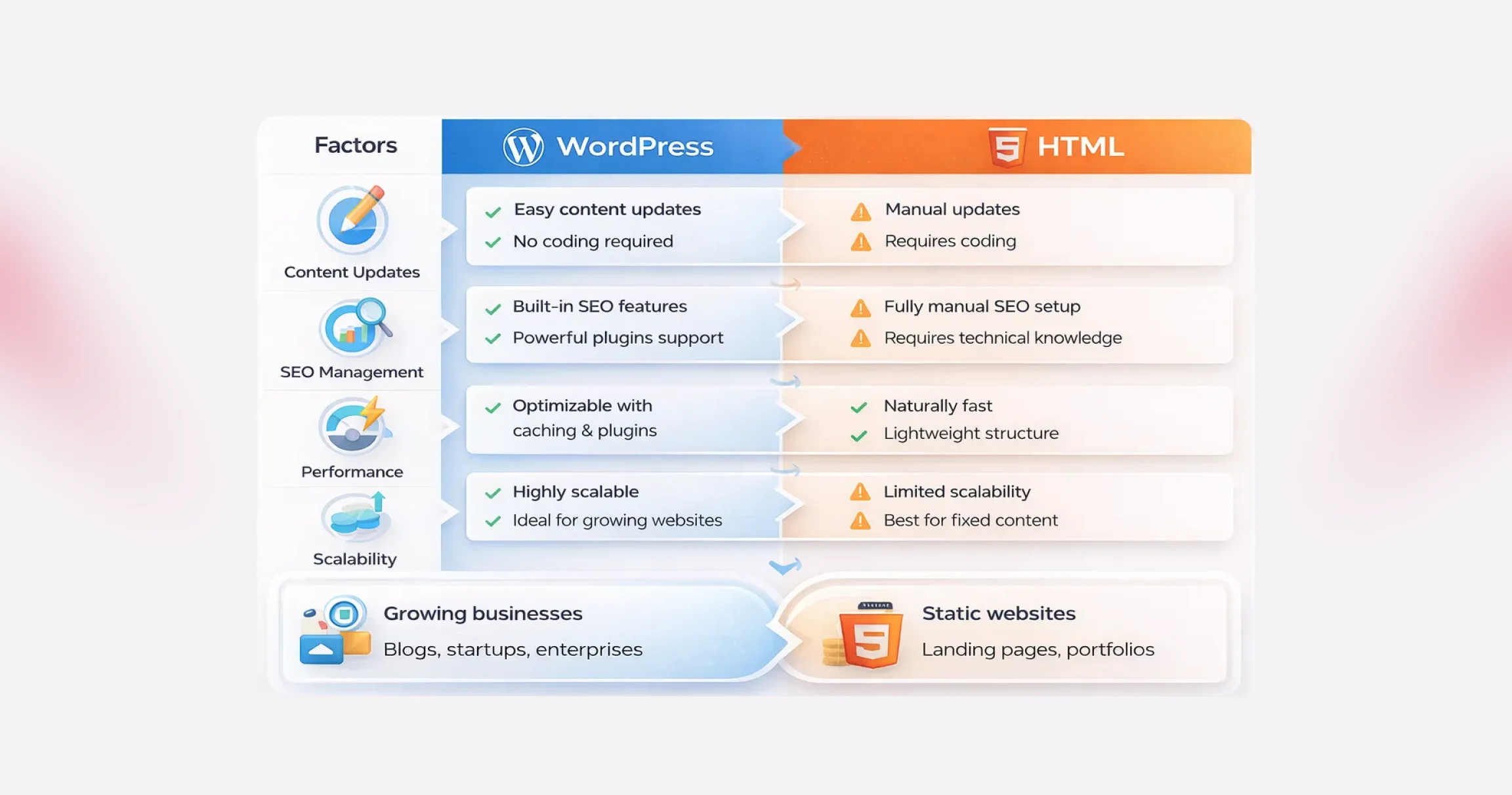
Choosing between WordPress and HTML isn’t about which option is “better.” It’s about understanding how each one fits your goals, resources, and long-term vision. When you look closely at WordPress vs HTML, the differences become clear, not just in how websites are built, but in how they grow, perform, and stay competitive over time.
#1. Ease of Use and Learning Curve
This is often the first deciding factor in the WordPress vs HTML discussion.
WordPress is designed to remove friction. You don’t need to touch code to publish content, update pages, or manage media. Everything happens inside a visual dashboard. Themes control layout. Plugins extend functionality. Even beginners can launch a professional-looking site quickly, which explains why WordPress dominates the CMS market.
HTML, on the other hand, assumes technical comfort. Building WordPress vs HTML websites with pure HTML means writing and managing code manually. You’ll need a working knowledge of HTML, CSS, and often JavaScript. Modern tools and IDEs make the process smoother, but the learning curve is still steeper, especially for non-developers.
Bottom line: If speed, accessibility, and ease matter, WordPress has a clear edge in the WordPress vs HTML comparison.
#2. Design and Customization
Design flexibility looks very different when comparing WordPress vs HTML websites.
With HTML, design freedom is absolute. Every visual element is controlled by code. Advanced developers can create highly customized layouts with pixel-perfect precision. But that freedom comes at the cost of time and effort.
WordPress takes a modular approach. You start with themes, then customize them using built-in settings, page builders, or custom development. Tools like Elementor and Divi allow drag-and-drop design, making customization accessible even without coding. For businesses that want flexibility without complexity, this balance is hard to ignore in the WordPress vs HTML debate.
Functionality follows a similar pattern. HTML sites rely on custom-coded features, while WordPress unlocks thousands of plugins that add capabilities in minutes.
Bottom line: HTML offers raw control. WordPress offers scalable customization, which is faster and more practical for most teams.
#3. Maintenance and Updates
Maintenance is where WordPress vs HTML websites start to diverge sharply.
WordPress requires ongoing attention. Core updates, plugin updates, and theme updates are essential for performance and security. While this sounds demanding, most updates are automated or handled with a few clicks and many businesses choose professional Website Maintenance Services to ensure these updates are managed consistently without disrupting site performance.
HTML websites are lighter and simpler. There’s no CMS, no database, and no plugins to update. That reduces routine maintenance. However, even small changes, like updating content or fixing a typo, require editing the code and redeploying files.
Bottom line: WordPress needs regular upkeep, but is easier to manage. HTML needs less frequent maintenance but demands technical involvement every time.
#4. SEO and Performance
SEO and speed are critical in any WordPress vs HTML comparison.
HTML websites are naturally fast. There’s no server-side processing or database queries. The server simply delivers static files, which usually means quicker load times right out of the box.
WordPress websites do more behind the scenes. Pages are generated dynamically, which can add overhead. But modern optimization techniques, such as caching, CDNs, and optimized hosting, can make WordPress sites extremely fast.
From an SEO perspective, WordPress pulls ahead. Built-in features like clean permalinks, media optimization fields, and automatic sitemaps help search engines understand your site. When supported by structured WordPress SEO Services, businesses can further refine technical optimization, content structure, and performance signals without needing to modify core code.
With HTML, SEO is entirely manual. You can achieve similar results, but every optimization requires direct code edits.
Bottom line: HTML wins on raw simplicity. WordPress wins on SEO flexibility and long-term optimization in the WordPress vs HTML websites comparison.
#5. Cost and Budget Considerations
At first glance, both options appear free. In reality, WordPress vs HTML comes down to where you spend money.
WordPress itself is open source, but costs can add up through hosting, premium themes, plugins, and maintenance. Dynamic sites also tend to need better hosting environments.
HTML websites often cost less to host because they’re lightweight. There are no paid plugins or themes by default. However, development costs can rise quickly if you don’t have in-house coding expertise and need professional help.
Maintenance costs also differ. WordPress demands ongoing attention. HTML demands fewer updates, but every change can cost time or money.
Bottom line: WordPress spreads costs over time. HTML concentrates costs upfront, especially if development skills are outsourced.
#6. WordPress vs. HTML: Scalability and Growth
Every website evolves. You add content, introduce new features, attract more visitors, and suddenly, the platform you chose in the beginning starts to matter more than expected. This is where the WordPress vs HTML comparison becomes practical rather than theoretical.
WordPress is built with growth in mind. Publishing new pages, expanding functionality, or adjusting layouts doesn’t require rebuilding the site. Plugins, themes, and hosting upgrades allow WordPress vs HTML websites to scale smoothly as traffic and business needs increase.
HTML websites, on the other hand, can handle high traffic efficiently, but growth comes at a cost. Every new feature, page, or update must be manually coded. As the project expands, development becomes slower and more resource-intensive.
Bottom line: If continuous growth, frequent updates, and evolving functionality are part of your roadmap, WordPress clearly has the edge. HTML works best when the scope is fixed and unlikely to change.
#7. WordPress vs. HTML: Security Considerations
- Did you know ? As per the IBM report, 44% of organizations experienced a security breach related to website vulnerabilities, highlighting the importance of active maintenance and security practices.
Security is often misunderstood in the WordPress vs HTML debate. Many assume static HTML sites are automatically secure and WordPress websites are risky. In reality, both platforms require thoughtful security practices.
WordPress websites are more complex. Databases, plugins, and themes increase the attack surface, which makes them attractive targets. However, this complexity also comes with mature security tools, regular updates, and active monitoring options.
Many businesses rely on professional WordPress Security Services to implement firewalls, malware scanning, vulnerability patching, and continuous monitoring to reduce risk and maintain site integrity.
HTML websites are simpler by nature. Without databases or server-side scripting, there are fewer entry points for attackers. That simplicity reduces risk but doesn’t eliminate it. If hosting access is compromised, attackers can still manipulate site files.
Bottom line: WordPress demands more attention but offers more protection tools. HTML is simpler, but responsibility rests entirely on how well access and hosting are managed.
Can You Use Both? (Hybrid Approach Explained)
Yes, this is more common than people think. A hybrid approach uses static HTML for the high-performance pages (home, landing pages) and WordPress for content-heavy sections (blog, docs).
How it works: Build your marketing pages as static HTML hosted on a CDN. Run WordPress as a headless CMS (using the WordPress REST API or WPGraphQL) to manage blog content. A static site generator like Next.js or Astro pulls the WordPress content at build time.
Best for: Teams with developer resources who want maximum performance without sacrificing content management flexibility.
-
See our guide on Top B2B APIs for Integration for examples of how the WordPress REST API is used as a content source.
Pros and Cons of WordPress and HTML
When comparing WordPress vs HTML, the decision often comes down to trade-offs. Both platforms are powerful in their own way, yet they solve very different problems. Understanding the strengths and limitations of WordPress vs HTML websites helps you choose a platform that aligns with your goals.
Pros and Cons of WordPress
WordPress is widely adopted for a reason. It lowers the barrier to entry while offering room to grow, but that convenience comes with a few considerations.
Pros of WordPress
- Free and open-source foundation: WordPress can be used without licensing fees, and its global developer community continuously improves performance, security, and features. This ecosystem is one of the biggest advantages in the WordPress vs HTML debate.
- Ease of use for non-developers: The dashboard is intuitive. Creating pages, publishing content, or updating layouts doesn’t require coding skills, making WordPress ideal for teams that want speed and autonomy.
- High flexibility and extensibility: From blogs to enterprise-grade platforms, WordPress adapts easily. Thousands of themes and plugins allow WordPress vs HTML websites to support advanced functionality without starting from scratch.
- Cost-effective entry point: You can launch quickly using affordable hosting and free themes, which makes WordPress attractive for startups and small businesses.
- SEO-friendly by design: Clean structure, customizable URLs, and SEO plugins help WordPress sites perform well in search results with less manual effort.
Cons of WordPress
- Hidden and recurring costs: While the core is free, expenses can add up through hosting, premium themes, plugins, and security tools.
- Security requires active management: WordPress sites are common targets due to their popularity. Regular updates and security plugins are essential to reduce risk.
- Performance can suffer if unmanaged: Too many plugins or poorly optimized themes can slow down a site, impacting user experience.
- Some technical setup is unavoidable: Initial installation, configuration, and ongoing maintenance still require a basic level of technical understanding.
Pros and Cons of HTML Websites
- Static HTML websites take a fundamentally different approach. They prioritize simplicity and control, which can be powerful but limiting.
Pros of HTML Websites
- Simple and lightweight development: HTML sites don’t rely on CMS platforms or databases. With basic coding knowledge, developers can build clean, predictable websites.
- Easy and flexible hosting options: Almost any server can host an HTML site, often at a lower cost than dynamic platforms.
- Fast loading speeds: Without server-side processing, HTML pages load quickly, offering excellent performance out of the box.
- Smaller attack surface: The absence of databases and dynamic scripts reduces common security vulnerabilities, a key consideration in WordPress vs HTML comparisons.
Cons of HTML Websites
- Time-consuming updates: Every change requires manual code edits. For content-heavy or frequently updated sites, this becomes inefficient.
- Requires technical expertise: HTML, CSS, and often JavaScript knowledge are necessary, making it less accessible for non-technical users.
- Limited flexibility: Adding new features or redesigning sections can mean rewriting large portions of the site.
- Not ideal for complex functionality: Static HTML struggles with advanced requirements like eCommerce, user accounts, or dynamic content.
In the broader discussion of WordPress vs HTML websites, neither option is universally better. WordPress prioritizes flexibility, growth, and ease of management, while HTML emphasizes speed, simplicity, and control. The right choice depends on how often your site changes, how complex it needs to be, and who will manage it day to day.

WordPress vs HTML: Which Platform Makes More Sense for Your Website?
Now that the strengths and limitations are clear, the real question is simple: which option actually fits your goals? The answer depends less on technology and more on how you plan to use your website and what you expect.
If flexibility, independence, and long-term growth matter, WordPress usually comes out ahead in the WordPress vs HTML debate. It gives you control without forcing you to rely on developers for every small update. Want to add new pages, refresh content, or test new ideas? WordPress lets you do that quickly and cost-effectively, which is why many growing brands prefer WordPress over HTML websites for business use.
On the other hand, if your website is purely informational and unlikely to change, a static HTML site can be a practical choice. It’s lightweight, fast, and does exactly what it’s built to do.
But if your website is meant to evolve and you want to generate leads, sell products, build a community, or create new revenue streams, WordPress offers far more room to scale. From eCommerce and memberships to digital downloads and online payments, WordPress supports growth without rebuilding your site from scratch.
In short, HTML works when your needs are fixed. WordPress wins when your ambitions aren’t.
Conclusion
Choosing between WordPress vs HTML isn’t just a technical decision; it’s a reflection of how your business plans to evolve online. Beyond features and performance, the right platform determines how quickly you can respond to market changes, experiment with new ideas, and deliver consistent user experiences. As digital expectations grow, businesses need website foundations that support agility, scalability, and long-term value rather than short-term convenience.
This is where QeWebby stands out. As a trusted custom WordPress development company, we help businesses design, build, and optimize websites based on real business outcomes, not assumptions. From strategy to execution, our experts ensure your website is future-ready and performance-driven. Contact us to explore how we can help you build a website that grows with your business.

Anubhuti Rathod
Content Marketing Manager
Anubhuti has spent nearly a decade crafting content strategies that make WordPress websites work harder. At QeWebby, she owns the full content marketing function, turning technical capabilities into audience-ready messaging that drives qualified traffic and leads.
Frequently Asked Questions
#1. Is WordPress better for SEO than HTML?
#2. Which is faster, WordPress or HTML?
#3. Which one is more secure: WordPress or HTML?
#4. Is WordPress free to use?
Yes, WordPress is open source and free to use. Costs may include hosting, themes, plugins, and maintenance.
#5. How do I decide which one is best for my business?
#6. Is WordPress better than HTML for beginners?
Yes, for most use cases. WordPress has a visual editor that doesn’t require any HTML knowledge, plus thousands of themes and plugins that handle design and functionality without code.
#7. Does Google rank HTML sites higher than WordPress?
No. Google ranks content, not platforms. A well-optimized WordPress site can outrank an HTML site and vice versa. Core Web Vitals can give static HTML a slight edge, but content quality and links matter more.
#8. Can I convert my HTML site to WordPress later?
Yes. The process involves migrating your HTML templates into a WordPress theme and importing content. It’s a technical project but very doable, especially for smaller sites.