













Table of Content

For modern B2B organizations, a WordPress website serves as a vital revenue channel and lead-generation engine. However, maintaining its stability, security, and performance is essential and requires ongoing upkeep, especially as businesses scale.
Managed WordPress maintenance is best for B2B companies that rely on their website for lead generation, security, and uptime, while DIY maintenance is suitable only for small or low-risk sites with in-house technical expertise and time to manage updates, security, and performance manually.
Many companies face the dilemma of whether to manage WordPress maintenance in-house or outsource it to specialists. While the DIY approach may seem cost-effective, it can quickly become a burden for stretched marketing and IT teams, especially as the complexity of plugins and cyber threats grows.
With over 300,000+ websites powered by WordPress, competition is high. Making regular updates, implementing security monitoring, maintaining backups, and optimizing performance are crucial. DIY maintenance demands technical expertise and constant attention, whereas outsourcing to trusted providers offers predictable performance, quicker issue resolution, and robust security.
This article will outline the pros and cons of each approach, helping B2B owners, IT managers, and digital marketers select the most suitable maintenance model to ensure business continuity and optimize site performance.
What Is Managed WordPress Maintenance?
Managed WordPress maintenance is a continuous process where a specialist team handles everything from core updates to theme changes, security monitoring, backups, performance tuning, and more. It differs from the DIY approach to handling updates, security, and bug fixes. This reduces the time and expertise required to run a website – how?
Managed WordPress maintenance often comes with hosting services bundles, which add to the WordPress-optimized infrastructure. It offers better scalability and ensures high availability for the site without disruptions. With such a service, you can provide predictable performance, strong security, and rapid bug fixes without the hassle of managing servers.
Who Should Choose Managed WordPress Maintenance?
- B2B companies generating leads through their website
- Sites with CRM, marketing automation, or gated content
- Teams without dedicated WordPress engineers
- Businesses requiring high uptime, security, and predictable performance
Key Features of Managed WordPress Maintenance Services
- Automated WordPress updates for core systems, plugins, and themes.
- Regular site backups with quick restore points that ensure faster recovery in case of incidents.
- 24/7 security monitoring with comprehensive malware scanning, firewall implementations, and multi-factor authentication.
- Performance optimization for the website through server-level caching, CDN integrations, and database fine-tuning for faster loading.
- Complete uptime and health monitoring of the website
- Access to WordPress expert teams to resolve plugin conflicts, errors, and best practice applications.
- End-to-end testing of the website, including staging environment configurations and automation.
- Migration assistance and disaster recovery options
Pros of a Managed WordPress Maintenance Service
- Managed WordPress maintenance services can help you save time and focus on content, growth, and business priorities.
- Ensures better website security posture through continuous monitoring, regular updates, and established procedures.
- Faster, more consistent performance via WordPress-tuned infrastructure and caching/CDN layers.
- Expert, WordPress-specific support that shortens troubleshooting and reduces downtime.
- Effortless scalability for campaigns and traffic spikes without manual capacity planning.
- Peace of mind with automated backups and quick restores if something goes wrong.
Cons of a Managed WordPress Maintenance Service
- Managed WordPress services can have a higher initial cost but offer more returns in the long term.
- Businesses have less control over server configurations, advanced customizations, and plugins.
- No flexibility to run different types of sites or migrate them to another CMS.
- Some managed services are often limited to specific plugins, which can reduce your options.
What Does DIY WordPress Maintenance Involve?
DIY WordPress maintenance is an approach of taking full responsibility for your website’s care, updates, and performance without relying on any managed service. It requires hands-on management to ensure your WordPress site is up-to-date, secure, and runs smoothly. This includes regular updates, backups, performance checks, and troubleshooting to ensure optimal system performance.
Who Should Choose DIY WordPress Maintenance?
- Small, low-traffic sites
- Teams with in-house WordPress expertise
- Non-critical marketing websites
Key Features of DIY WordPress Maintenance Approach
- Regular updates for WordPress core, plugins, and themes
- Routine backups and testing restore points.
- Security monitoring (utilizing plugins such as Wordfence or Sucuri).
- Database cleanup and optimization.
- Spam comment management and user account reviews.
- Broken link checks and form testing.
- Performance monitoring and error log review.
- SEO audits and content updates.
- Manual documentation and training for involved team members.
Pros of DIY WordPress Maintenance Approach
- Complete control over server setup, plugins, updates, and customizations.
- Lower cost, as you avoid fees charged by managed service providers.
- Flexibility for advanced or unique technical needs, including specialized plugins or scripts.
- Ability to optimize, experiment, and troubleshoot as needed.
Cons of DIY WordPress Maintenance Approach
- Time-consuming and requires ongoing attention to detail.
- Increased risk if security vulnerabilities, plugin conflicts, or errors go unnoticed.
- Requires technical knowledge to troubleshoot, restore, and prevent major issues.
- Mistakes during updates or backups can result in downtime or data loss.
- No guaranteed expert support, leaving all maintenance and fixes up to the site owner.
Detailed Comparison of Managed WordPress Maintenance vs DIY Approaches
Comparing managed WordPress maintenance services with a DIY approach requires consideration of cost, expertise requirements, security, performance, scalability, and support.
Key Differences at a Glance
The main difference between managed WordPress maintenance and DIY maintenance lies in responsibility, risk, and scalability. Managed services offer proactive security, automated updates, and expert support, while DIY maintenance requires manual effort, technical expertise, and carries higher operational risk as websites grow.
Let’s start with the cost considerations of using both methods for B2B companies.
| Feature | DIY WordPress Maintenance | Managed WordPress Maintenance |
|---|---|---|
| Cost (Estimation) | $0–$100/month | $100–$500+/month |
| Time Commitment | 5–15+ hours/month (staffed) | Minimal (provider handles most tasks) |
| Required Expertise | Moderate to high technical troubleshooting skills | Minimal WordPress usage/familiarity |
| Security & Risk | Manual, expertise-dependent; higher exposure | Proactive, expert auditing, 24/7 monitoring |
| Performance | Manual optimization; plugin/setup dependent | Server, CDN, cache optimized by experts |
| Scalability & Support | Poor, increasingly complex with growth | Automated scaling, multi-site support |
1. Cost Considerations for B2B Companies
Managed services typically cost $100- $500+ per month for enterprise-grade offerings. At the exact time, DIY costs are as low as $0-$100/month, depending on the type of plugins, tools, and internal staff support you may need.
Managed solutions provide bundled packages that include security updates, backups, support, and uptime guarantees. A DIY approach may be cheaper, but it often comes with hidden costs. For example, you need to hire in-house staff who can work dedicatedly on WordPress maintenance or divert existing staff from core business activities.
Especially for the complex B2B sites, managed WordPress maintenance services make more sense due to a predictable cost structure. DIY, on the other hand, is an approach where prices escalate with an increase in the technical complexity of the website.
2. Time Commitment and Required Expertise
3. WordPress Site Backups: Managed Service vs DIY
Ensuring you have proper backups is crucial, especially in the event of an incident or cyber attack, as it will help you recover quickly. DIY backups offer the benefit of complete control over backup configurations, but manually testing, removing, and adding backups can be tedious.
On the other side, a managed WordPress maintenance service ensures automation of the backup process. Set a daily schedule according to your requirements for the backup, and the system will automatically create a backup.
4. Plugins & Core Updates
If you choose the DIY approach, maintaining each plugin, ensuring timely updates, and security can be complex. For example, if you have multiple sites, you have to update plugins across all of them. This can increase manual efforts if you choose the DIY approach.
One of the key benefits of WordPress maintenance provided through managed services is the automation of plugin updates. Many WordPress website maintenance packages offer end-to-end plugin update automation by default.
Plus, managed hosting providers handle server maintenance, PHP updates, and server-side software. This means you can optimize core updates by outsourcing WordPress maintenance.
5. Performance Optimizations
Managed WordPress maintenance handles licenses and support, as well as pre-configuring all servers across sites for optimal performance. On the contrary, the DIY approach requires manual configurations, which are necessary to fine-tune site performance.
Each site may have unique challenges in terms of performance, loading time, and server management. Therefore, if you have multiple sites, managed WordPress maintenance is a sensible option.
6. Security And Risk Management
A DIY approach relies heavily on your internal team’s technical expertise. Routine tasks, such as malware scanning, patching vulnerabilities, configuring firewalls, and monitoring suspicious activity, must be performed manually and consistently to ensure optimal security.
Any delays or missed updates can expose your site to significant risks. Especially for B2B companies handling sensitive customer data, CRM integrations, or gated assets, these become crucial. Managed WordPress maintenance, however, offers a proactive security posture.
Providers run continuous 24/7 monitoring, apply real-time threat detection, and implement enterprise-grade firewalls and malware removal tools. Security patches are deployed instantly, reducing the attack window and minimizing operational disruptions. Most managed services also include incident response support, helping you recover quickly without diverting internal resources.
Security Verdict
For B2B websites handling customer data or lead funnels, managed WordPress maintenance provides significantly lower risk than DIY approaches due to continuous monitoring, faster patching, and expert incident response.
Now that you know the difference, it’s time to understand a step-by-step approach to WordPress maintenance.
How to Get Started with WordPress Maintenance
WordPress maintenance is a continuous process and needs constant monitoring. This is why you need to plan the entire maintenance. With a managed service, you don’t need to worry about planning or execution. However, if you choose DIY, you need to be mindful of specific tools and access permissions, which you will need before implementing the WordPress maintenance approach.
What You Need Before You Begin (Tools, Access, Resources)
First and foremost, you will require access to WordPress admin, hosting panel, SFTP/SSH, database (phpMyAdmin), DNS, and license portals for premium plugins/themes. You will need to install and configure a reliable backup plugin or service. Verify the off-site storage and ensure multiple copies of the site are stored at different locations. Other prerequisites are,
- Add a reputable security plugin with a WAF, malware scanning, login security, and optionally two-factor authentication (2FA).
- Create a safe sandbox to test updates and restores before deploying them to production, which is often included in various services and specialized tools, such as BlogVault workflows.
- Monitor uptime alerts, performance metrics, and scan the site regularly for malware.
Step-by-Step Guide to Setting Up and Managing WordPress Site Maintenance
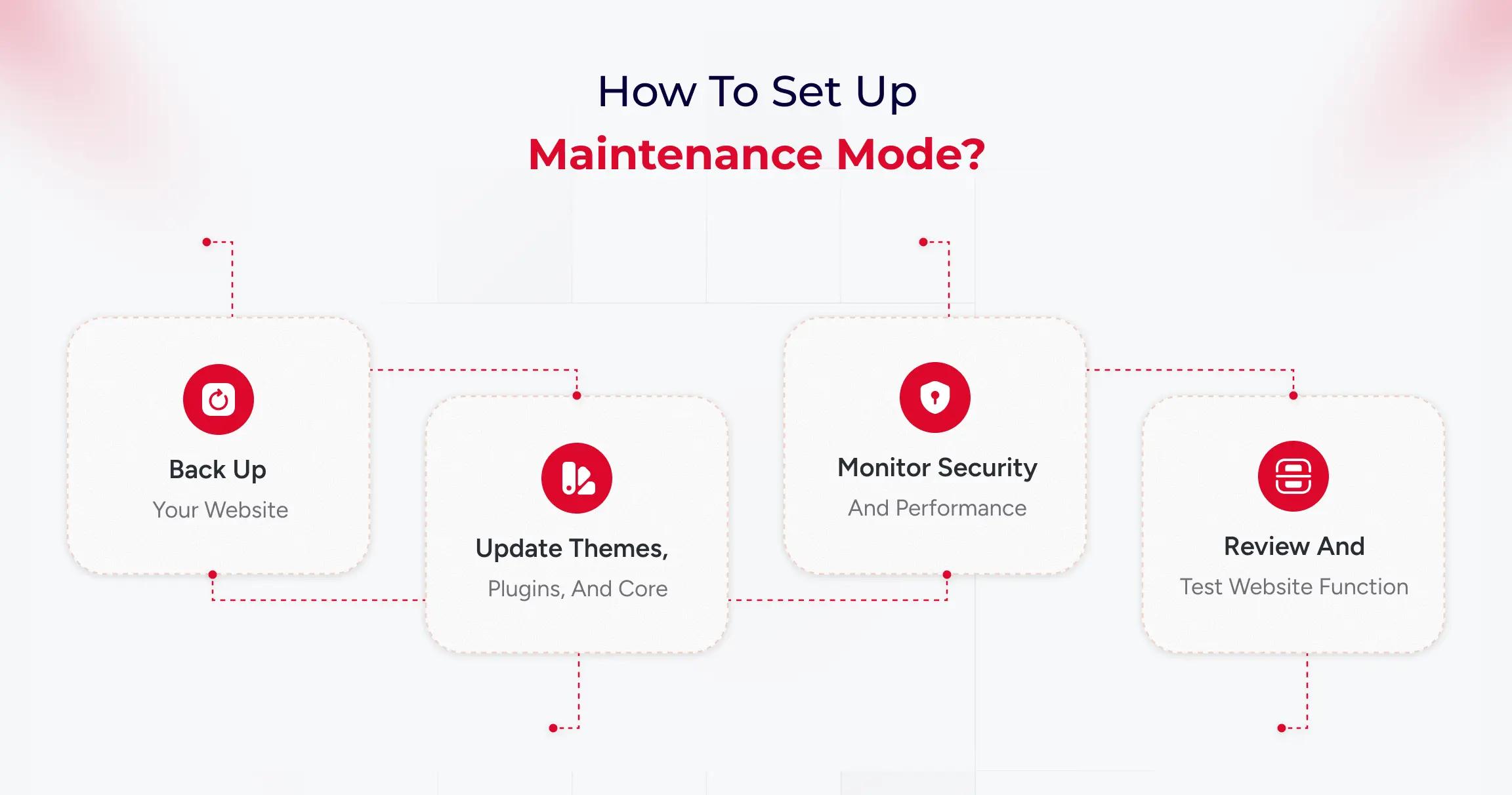
WordPress maintenance involves five ongoing tasks: backing up data, updating software, monitoring security, optimizing performance, and testing functionality. Managed services automate these tasks, while DIY approaches require manual execution and technical oversight.
Step 1: Back up your website
Think of a backup as a safety copy of your entire site, including both the visible content (themes, plugins, uploads) and the hidden infrastructure (the database with posts, pages, users, and settings). Set up automatic full backups on a schedule and store copies off-site (such as Google Drive, Dropbox, or a backup service) so you can restore if anything breaks or gets hacked.
Run a quick “test restore” occasionally to be sure those backups actually work before you need them in an emergency.
What to do in practice:
- Install a reputable backup tool and schedule both file and database backups (daily/weekly, depending on how frequently your site changes).
- Save backups to external storage and keep several recent versions for safety.
- Make a quick note of restore steps so you’re not guessing during a crisis.
Step 2: Update themes, plugins, and core
Updates fix bugs, patch security holes, and improve compatibility, so keeping WordPress core, plugins, and themes current is one of the easiest ways to stay secure and stable. Before updating, ensure that a fresh backup exists. For larger or more complex sites, test updates on a staging copy first to avoid breaking live pages.
After updating, give the site a quick check to confirm layouts, forms, and key features still work as expected.
What to do in practice:
- Update weekly (or sooner for security releases), starting with plugins, then themes, then core if needed, while having a recent backup ready.
- Remove plugins and themes you don’t use; fewer moving parts means fewer risks and faster pages.
- For significant updates, consider delaying a couple of weeks if your site is sensitive, and test on a staging environment first to catch conflicts early.
Step 3: Monitor security and performance
Security monitoring identifies malware, suspicious logins, and known vulnerabilities, allowing you to respond quickly if something’s amiss. Enable basics like strong passwords, two-factor authentication, and limited login attempts, and use a security scanner to run routine checks automatically. At the same time, keep an eye on performance uptime alerts, page speed, and Core Web Vitals.
What to do in practice:
- Turn on daily security scans and get alerts for downtime and unusual activity (user activity logs help pinpoint what changed and who did it).
- Review speed weekly: large images, bloated plugins, and full caches can slow you down, so optimize images, purge cache, and prune heavy add-ons.
- Set a cadence: daily automated scans/uptime checks, weekly performance updates, monthly backup tests, and a deeper audit for peace of mind.
Step 4: Review and test website functionality
After changes or on a regular schedule, click through your most essential paths like a visitor to ensure everything still works, such as menus, contact forms, checkout, and search. Check for broken links, missing images, and unusual layout shifts, as even minor issues can frustrate users or lead to lost conversions.
If something’s off, roll back using your latest backup or disable the last update to isolate the problem, then retest before going live again.
What to do in practice:
- Keep a short checklist: homepage load, key landing pages, forms, login, cart/checkout, and search.
- Run a quick broken link and spam comment cleanup as part of routine maintenance to keep the site tidy and trustworthy.
- If you manage multiple sites, consider using a central panel to view updates, uptime, and performance at a glance, saving you time.
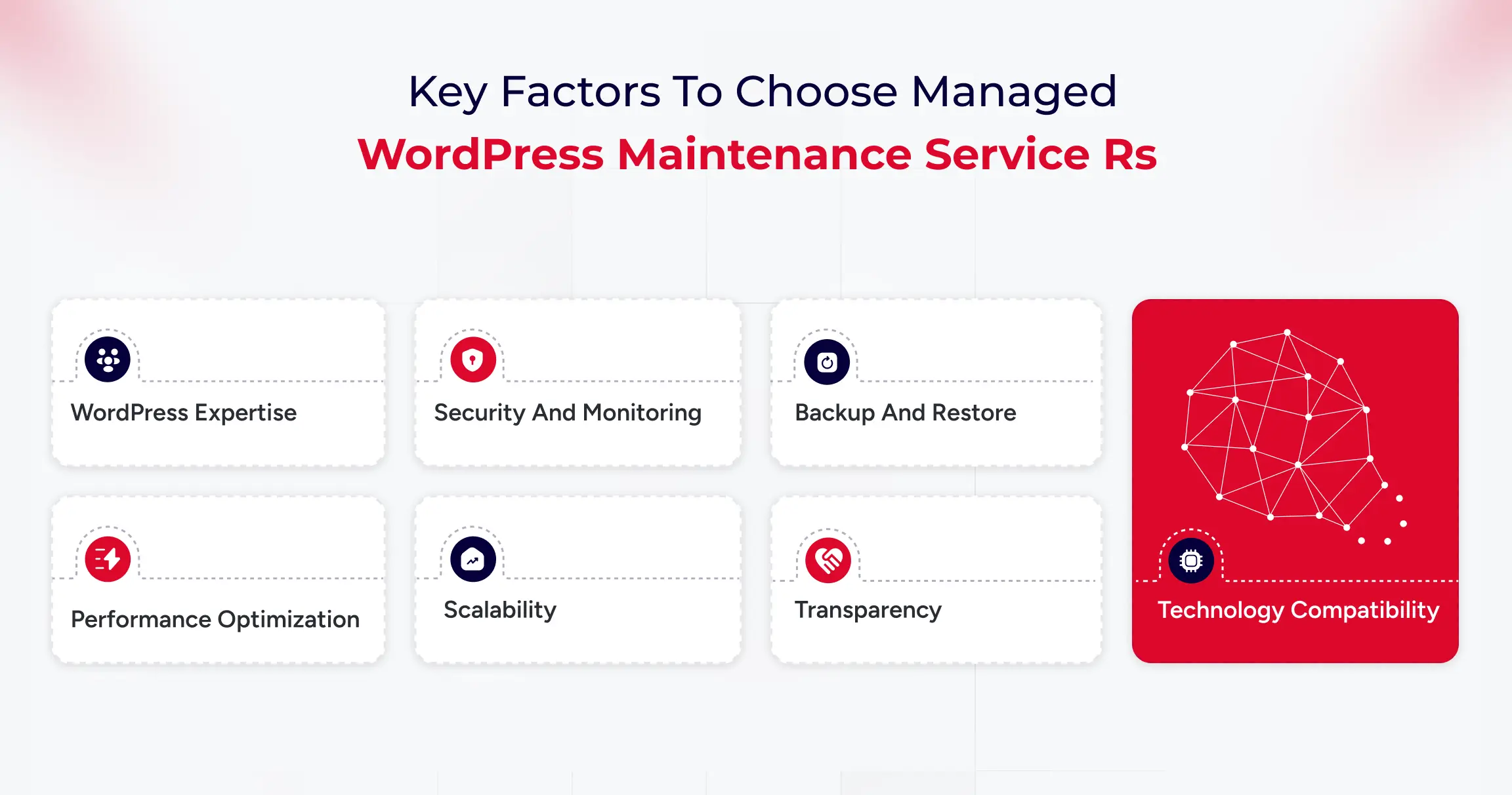
How to Choose the Best Managed WordPress Maintenance Service for Your Company
When selecting a managed WordPress maintenance partner, consider it as finding a long-term team member. Your provider should offer consistent performance, strong security, reliable support, and a plan that aligns with your business goals.
For B2B organizations, it’s vital to choose partners that understand complex site setups and the need for smooth digital operations. A good service should require little involvement from your internal teams.
Updates, monitoring, backups, and performance tuning should happen regularly. The best providers keep your site stable and anticipate issues before they arise.
Key Factors to Consider
- 1. WordPress Expertise: Ensure the team has experience with enterprise-level WordPress and can handle plugin conflicts and performance optimization.
- 2. Security and Monitoring: Look for 24/7 threat detection, web application firewall (WAF) protection, and clear incident response plans to reduce risks during attacks.
- 3. Backup and Restore: The provider should offer daily backups, off-site storage, and tested restore options to ensure business continuity.
- 4. Performance Optimization: Evaluate their caching methods and load testing to support high traffic.
- 5. Scalability: Your provider should support growth, such as adding subdomains or expanding to multi-site setups.
- 6. Transparency: Request access to uptime logs, performance metrics, and support documentation to understand what’s being maintained.
- 7. Technology Compatibility: Ensure the service works with your preferred plugins, tools, and systems.
Affordable Maintenance Solutions for Small Businesses
Small businesses often struggle to strike a balance between costs and reliability. While enterprise-level services offer extensive coverage, many companies don’t need such expensive plans. It’s essential to find providers that deliver affordable packages without sacrificing key security, updates, and backups.
Cost-effective maintenance solutions typically include automated updates, uptime monitoring, malware scanning, regular backups, and basic performance improvements, often at a fraction of the cost of a full-time technical team. These services help businesses stay secure and ensure their site runs smoothly.
The right plan should be easy to manage and reliable, allowing you to focus on attracting customers and growing your business. If a provider offers add-ons, transparent pricing, and straightforward service agreements, it’s likely a good fit.
User Experiences and Feedback on Managed WordPress Maintenance
Many B2B companies find that outsourcing WordPress maintenance reduces their workload and improves website reliability. Regular updates, automated backups, security monitoring, and performance optimization are key benefits.
Professional maintenance helps prevent problems, providing stability during busy times and product launches. Companies with multiple websites, especially those with managed plans, benefit from this, as it reduces plugin conflicts and downtime.
Most users are satisfied but suggest choosing a service with clear deliverables and proactive communication. Overall, businesses appreciate the peace of mind that comes with outsourcing this task.
Common Challenges and How Services Address Them
Here are some of the key challenges that managed WordPress maintenance services can handle.
Frequent Updates and Compatibility Issues
B2B companies often struggle with keeping WordPress up to date, which can lead to compatibility issues if not thoroughly tested. Managed maintenance services test updates in staging environments and apply them only after confirming stability, preventing downtime, and ensuring smooth website functionality.
Growing Security Risks and Vulnerabilities
Security is a significant concern for businesses that use WordPress. Risks like plugin vulnerabilities and malware can disrupt operations. Managed maintenance services offer comprehensive security monitoring, regular scans, robust firewalls, reliable backups, and swift threat responses to maintain a secure environment and minimize downtime and recovery times.
Performance Degradation as Websites Scale
As websites expand, they may become slower, which can impact SEO and user engagement. Maintenance services enhance performance by optimizing caching, cleaning images and databases, configuring CDN, and making hosting adjustments, ensuring the site remains fast and competitive.
Internal Resource Limitations and Time Constraints
Managing WordPress can distract internal teams from essential tasks. Technical issues take time away from campaigns and content creation. Managed maintenance services handle website upkeep, allowing teams to focus on core business activities.
Selecting the Right Maintenance Partner
Choosing a maintenance provider can be a challenging task. Some plans focus solely on basic updates and overlook important areas, such as security and performance. Selecting a service with clear agreements, detailed reporting, and B2B experience ensures effective management and proactive problem-solving.
Final Verdict: Managed vs DIY WordPress Maintenance
Managed WordPress Maintenance is a strategic investment that protects brand reputation, boosts digital performance, and supports scalability for B2B organizations. As websites become increasingly vital for lead generation and customer experience, reactive management is no longer sufficient.
A dedicated maintenance partner ensures precise execution of updates and optimizations, minimizing the risks of downtime and security breaches. For growth-focused businesses, this leads to consistent performance, enhanced search visibility, and a digital infrastructure that evolves to meet changing business objectives.