











WordPress 7.0 launched on May 20, 2026, and it is the most consequential release the platform has shipped in nearly a decade.
This is not a point release with incremental improvements. WordPress 7.0 formalizes Phase 3 of the Gutenberg roadmap, ships a provider-agnostic AI infrastructure layer, rebuilds the admin interface using React, and restructures how editorial teams collaborate inside the editor.
The release was originally scheduled for April 9, 2026, but the core team delayed it to address architectural concerns, a decision that signals where priorities sat. WordPress 7.0 has officially arrived. It came with one flagship feature removed and the platform’s foundations meaningfully strengthened.
This guide covers every meaningful change, skips the minor patches, and ends with the exact three things you should test before clicking Update on a live site.
What’s Actually New in WordPress 7.0 vs 6.0
- Here’s what changed at the feature level (not just bug fixes):
- Redesigned block editor toolbar — unified controls, reduced cognitive load
- Native font library — upload and manage custom fonts without a plugin
- Interactivity API improvements — better client-side state management for dynamic blocks
- Performance: Core Web Vitals improvements averaging 15-18% faster LCP
- Full-site editing: new template hierarchy controls for finer page-level design
- Updated media library: bulk edit, better search, and folder-like collections
Tip: If you’re updating from 6.3 or earlier, read the migration notes for each version between yours and 7.0 some intermediate releases introduced breaking changes for specific plugin categories
Why WordPress 7.0 Matters More Than Recent Updates
WordPress 7.0 formalizes Gutenberg Phase 3, which shifts the platform’s editorial model from individual-user publishing to team-based content operations.
Infrastructure Evolution, Not Just an Interface Refresh
WordPress 7.0 is not a cosmetic update. The admin interface, AI integration model, media processing pipeline, and PHP support boundaries have all been rearchitected to touch every layer of a running WordPress installation.
That separation from typical incremental updates changes the risk profile for agencies and enterprise teams planning upgrades, and it is the first thing worth understanding before a single plugin compatibility check.
WordPress 7.0 as the Foundation for AI-Ready Sites
The most important thing WordPress 7.0 ships is not a single feature. It is the AI infrastructure layer that governs how every future AI-powered plugin interacts with the platform.
Before this release, WordPress had accumulated a fragmented set of competing AI implementations, in which each plugin built its own permission system, provider connection, and access logic. That fragmentation created security exposure and unpredictable behavior across sites running multiple AI tools simultaneously.
WordPress 7.0’s AI Client and Abilities API resolve that fragmentation structurally rather than through guidelines alone. Whether or not you activate any AI features today, your site now runs on a platform that has defined how AI integration should work for the entire ecosystem going forward.
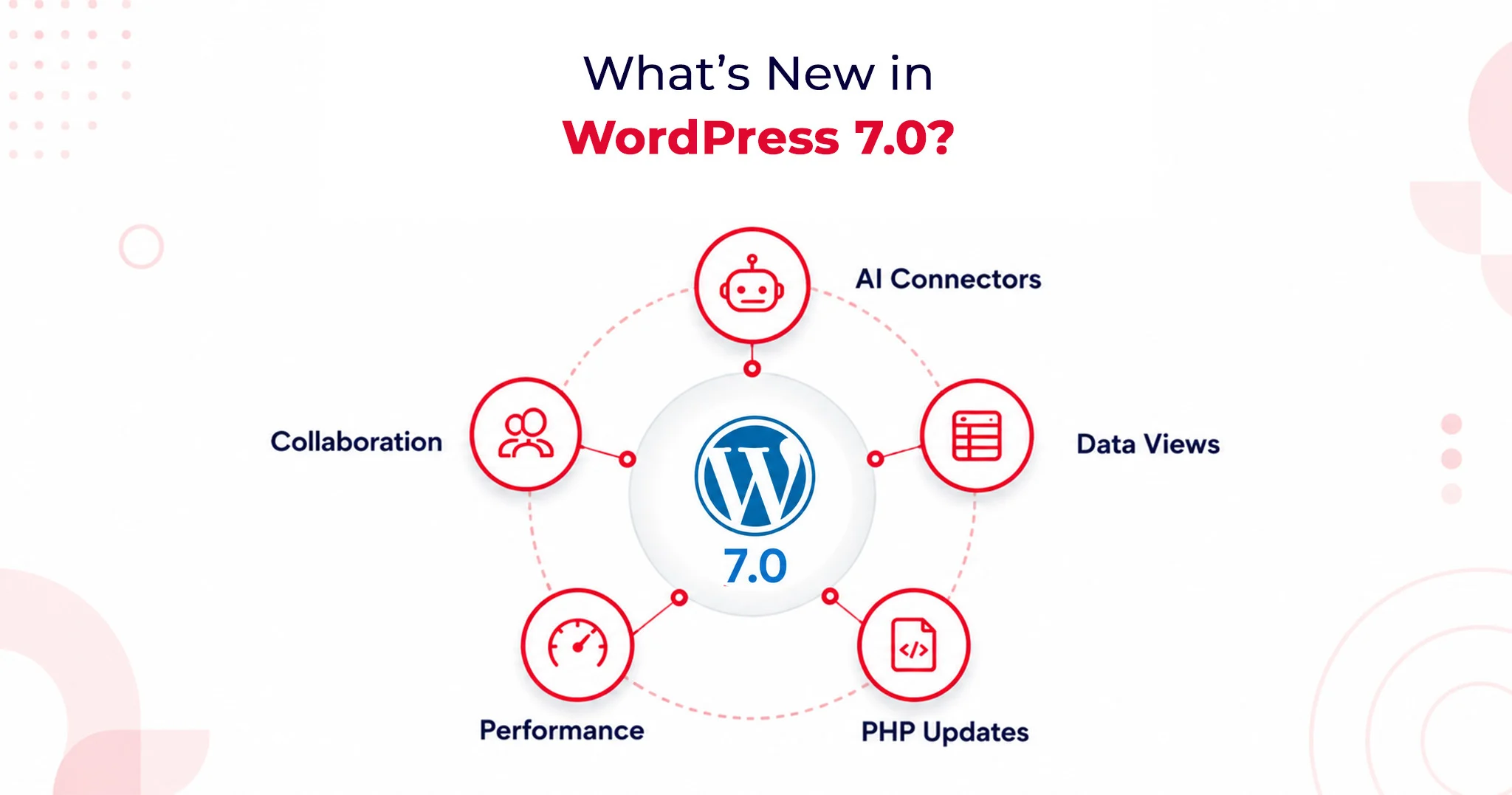
Major Features in WordPress 7.0: A Complete Breakdown
WordPress 7.0 introduces fundamental shifts in how the platform handles artificial intelligence, backend management, and team collaboration. Here is an optimized look at what you need to know about this landmark update.
1. AI Client and AI Connectors: A Provider-Agnostic AI Layer
WordPress 7.0 officially brings AI into the core experience by shipping a Web Client AI API. This establishes a standardized, deeply integrated interface that plugins and themes can use to connect to external AI providers.
According to WordPress.com’s official release documentation, the platform includes three pre-registered connectors right out of the box: OpenAI, Anthropic, and Google.
Why this matters:
- Vendor Neutrality: The core team deliberately avoided locking users into a preferred AI service. You aren’t forced into a single model provider.
- Centralized API Management: Site administrators simply enter one API key per provider. Any plugin built against the AI Client can leverage that connection immediately without requiring a separate plugin-level setup.
- Future-Proofing: This design protects site owners from lock-in as the AI landscape shifts and gives developers a highly stable API surface to build against.
Practically, this streamlined setup powers features like:
- Smart content suggestions
- Auto-generated alt text
- One-click summarization
- Translation assistance
The Abilities API: Enterprise-Grade Security
To keep these powerful tools in check, WordPress 7.0 introduces the Abilities API. This defines exactly what AI tools are permitted to do within your installation.
Plugins must explicitly register their capabilities (e.g., creating posts, editing metadata, generating image descriptions). AI tools read these permissions in a structured way and operate strictly within defined boundaries. For enterprise site owners managing complex automation workflows, this boundary enforcement provides foundational security architecture, not just a convenience layer.
2. DataViews Admin Redesign: A Modern SaaS-Style Control Center
Say goodbye to WordPress’s classic PHP-rendered admin list tables. DataViews is a new React-based content management interface for posts, pages, media, and users. This redesign fundamentally alters how the backend behaves, not just how it looks.
The DataViews Upgrade:
- Zero Reloads: Filtering, sorting, and bulk editing happen instantly without a full-page reload.
- Seamless Toggling: Site administrators can fluidly switch between table, grid, and list views on the exact same screen.
- Instant Updates: Grouping by status, author, or category updates on the spot.
This operational speed saves measurable hours per month for teams managing large content libraries. By bringing the admin experience closer to modern SaaS workflows like Notion and Airtable, editorial teams no longer have to justify a clunky backend to stakeholders.
3. Notes and Editorial Collaboration
Editorial workflows are getting a massive asynchronous upgrade, though the highly anticipated live-editing feature has been pushed back.
Real-Time Co-Editing Delayed
Real-time collaborative editing was officially removed from WordPress 7.0 on May 8, 2026. The core team pulled the flagship feature after race conditions, fuzz testing failures, and server memory concerns under concurrent load made it unsafe to release at scale.
If you were planning to restructure your editorial workflow around live co-editing, you will need to look toward a future WordPress release.
What Shipped: The Block-Level Notes System
While live co-editing is delayed, the new block-level Notes system has successfully shipped, and it covers the vast majority of what editorial teams actually need daily.
Key Collaboration Features:
- Targeted Feedback: Editors can leave comments tied directly to specific blocks or text selections.
- Team Tagging: Easily loop in teammates using @mentions.
- Suggestions Mode: Propose changes that preserve the original text until the author explicitly accepts or rejects the edit.
This asynchronous collaboration model resolves major coordination friction without demanding the heavy WebSocket infrastructure that live co-editing requires from hosting environments.
Performance and Infrastructure Improvements
WordPress 7.0 Upgrade Guide: What Changes Under the Hood
Browser-side media processing is one of the most significant infrastructure changes in WordPress 7.0, profoundly impacting both site performance and plugin compatibility.
Uploaded images are now processed directly in the browser using WebAssembly before ever reaching the server. This means compression, resizing, and thumbnail generation all happen on the client side.
The media uploader now features real-time compression previews via slider controls, alongside saliency detection for automatic smart cropping based on an image’s most visually significant area.
With WordPress 7.0, the Block Editor loads noticeably faster. The iframe isolation model, which prevents style bleed between the admin area and the frontend, has also been refined, improving editing accuracy across both Block and Classic theme configurations.
The Benefit: This shift drastically reduces server resource consumption and adds native support for modern image formats, including HEIC and AVIF, without requiring server-side library updates or changes to your hosting environment. It also demonstrates how performance improvements are shaping modern web design by delivering faster, more efficient media handling directly in the browser.
PHP 7.4 Minimum Requirement and PHP 8.3 Compatibility
WordPress 7.0 officially draws a line in the sand regarding server environments:
- The Baseline: It sets the PHP 7.4 Minimum Requirement, officially dropping support for PHP 7.2 and 7.3. Sites running those outdated versions will remain on the 6.9 branch (which receives security patches only) and will not receive the WordPress 7.0 update. Discovering this non-negotiable boundary on upgrade day is an avoidable operational disruption.
- The Goal: The core team strongly advocates for PHP 8.3 Compatibility. Running PHP 8.3 or higher delivers measurable performance improvements, stronger type safety, and better alignment with modern development tooling. Upgrading to 8.3 positions your site safely for the next two to three release cycles.
- Action Item: Check your hosting control panel or contact your host to verify your PHP version before scheduling your upgrade.
What Website Owners Should Check Before Updating to WordPress 7.0
Your WordPress 7.0 Upgrade Guide: Pre-Update Checklist
The only safe path to upgrading to WordPress 7.0 runs through a staging environment first. You must clone your production site, apply the update, and test comprehensively before pushing it live. This is entirely non-negotiable for installations that run custom blocks, have heavy admin modifications, or use server-side image plugins.
Your Pre-Update Checklist:
- Full Backup: Secure the database and file system. WordPress 7.0 alters database structures and file handling, complicating mid-upgrade recovery if things go wrong.
- PHP Verification: Confirm your version at the hosting level.
- DataViews Compatibility: Review plugin changelogs for explicit DataViews support notes.
- Editor Testing: Verify theme behavior within the new iframe-based editor.
- React 19 Audit: Test custom block compatibility with React 19’s updated patterns.
- Rule Validation: Check your caching and CDN rules following the admin interface change.
WordPress 7.0 Upgrade Guide: Plugin and Theme Compatibility Testing
The shift from classic PHP list tables to the React-based DataViews interface means certain plugins are at risk. Admin plugins that add custom columns, filters, bulk actions, meta boxes, or custom quick-edit fields to the Posts, Pages, or Users screens may not render correctly until their maintainers ship compatibility patches. This is especially important when evaluating the best A/B testing plugins compatible with WordPress 7.0, as they should be updated to support the new DataViews interface.
Media Plugins: Because image processing now begins in the browser before server-side hooks fire, media plugins that rely on early-stage upload interception must update their integration points. Actively maintained plugins should already have patches.
WordPress 7.0 WooCommerce Compatibility: What Store Owners Need to Know
Major ecosystem players WooCommerce, Yoast SEO, ACF, and Elementor have already shipped WordPress 7.0 compatibility updates ahead of the May 20 release. WooCommerce’s compatibility advisory confirmed rigorous testing across the release candidate cycle; standard configurations with major eCommerce extensions passed without regressions.
Where the risk lies:
- Older, poorly maintained WooCommerce extensions.
- Custom payment gateway integrations using legacy WordPress admin hooks.
- Modified checkout flows are dependent on classic list table structures for order management.
If your store runs a standard WooCommerce setup, your risk is low. If your order management relies on custom admin modifications, prioritize those on your staging checklist immediately.
Will WordPress 7.0 Break Existing Plugins or Themes?
Yes, WordPress 7.0 carries a meaningfully higher risk profile than a typical point update. This is due to architectural depth, not careless engineering. The core shifts to the admin interface, media processing pipeline, and React version create new surface areas where older integrations can break without warning.
However, the core team’s commitment to backward compatibility remains firm:
- Classic themes remain fully supported.
- The Font Library, previously restricted to Block Themes, now officially extends to Classic Themes.
Custom blocks built against older React patterns require focused attention. Because the admin move to React 19 alters component lifecycle behaviors, any custom block development untouched in the last 18 months needs a dedicated compatibility audit on a staging site.
Is WordPress 7.0 Safe to Update Immediately?
- For personal sites & standard blogs: Yes. Test on staging first, then update.
- For Enterprise, Agencies & WooCommerce: No. Wait for the 7.0.1 and 7.0.2 minor patch releases before touching production.
Minor patches historically address the edge-case failures that crop up in the first 2–4 weeks. Given the architectural depth of 7.0, an active issue queue is guaranteed. Waiting costs little, but protects you from disproportionate recovery efforts in complex environments.
Agency Best Practice: Build a validation workflow. Require staging confirmation, plugin compatibility sign-off, client communication regarding interface changes, and a verified rollback path. WordPress 7.0 is stable, but planning for edge cases is the only professional response.
The Verdict
WordPress 7.0 is a genuine infrastructure release, not a marketing milestone. The AI Client, DataViews admin redesign, and browser-side media processing collectively shift what WordPress can do for content teams operating at scale. While real-time collaborative editing did not ship, the platform’s foundations are substantially stronger, highly AI-ready, and better suited to modern content operations than they were before May 20, 2026.