














Table of Content

Modern eCommerce platforms treat payments as core infrastructure. For any online business, how customers complete transactions directly impacts revenue, trust, and long-term growth. A poorly configured checkout can cause abandoned carts, failed transactions, and frustrated buyers.
That’s why WordPress payment gateway integration is not just a technical task. It’s a strategic decision that affects conversion rates, security, and scalability.
Businesses today can choose between hosted processors, on-site integrations, or even custom payment gateway development, depending on their operational needs. Each approach influences compliance requirements, customer experience, and system complexity.
When payment systems fail, whether due to timeouts, false declines, or WordPress checkout issues, revenue loss compounds quickly. This guide explains how payment gateways work in WordPress, how to implement them correctly, and how to troubleshoot common problems before they impact your business.
Types of Payment Gateways Supported by WordPress
Selecting the proper integration method is the first step before you look at specific providers. You must decide whether to keep data off-site to improve compliance or to keep users on-site for a better brand experience.
This fundamental choice shapes your security posture and conversion rates just as it does for major eCommerce platforms. Understanding these architectures is essential when you plan your WP payment gateway strategy.
1. Hosted Payment Gateways
Hosted payment gateways manage the transaction process by directing the customer away from your WP payment gateway interface to a secure processor page. You simply redirect the user to a trusted environment where they enter their details, then return to your success page.
Major platforms initially relied on external processors to build consumer confidence during the early internet era. You can use the same strategy to reassure cautious buyers who prefer entering their data on a familiar URL, such as PayPal, rather than an unknown store. This method reduces your security burden since the processor handles sensitive data.
Trust plays a decisive role in checkout completion. Around 17% of online shoppers abandon purchases because they don’t trust the site with their payment information, making recognizable payment brands an important confidence signal.
Benefits:
- Lower security responsibility
- Faster setup
- Trusted external payment pages
- Reduced PCI compliance scope
2. On-Site Direct Payment Gateways
On-site gateways allow customers to enter credit card information directly on your WordPress payment module without leaving the checkout page. You create a seamless experience that generally leads to higher conversion rates and a more professional feel for your brand.
Seamless checkout experiences are especially important on mobile devices, which now account for more than 60% of global eCommerce traffic. Optimized on-site payments help prevent abandonment during mobile transactions.
Replicate the friction-free checkout of modern apps. Leading tech companies use invisible payments to remove barriers between users and services. You can implement similar direct integrations using APIs that serve as digital bridges. This gives you complete control over the authorization flow while modern tokenization ensures raw data never touches your server.
Benefits:
- Higher conversion rates
- Better user experience
- Full control over checkout design
- Support for subscriptions and advanced billing

Best Payment Gateways for WordPress in 2026
Here are some of the popular payment gateways that you can leverage for a WordPress website.
1. WooPayments WooCommerce Payments
This native solution lets you manage payments and disputes directly from your dashboard without requiring external logins. You get support for multicurrency transactions and digital wallets like Apple Pay, which simplifies the buying process.
2. Stripe
Stripe is a developer-friendly platform known for its flexibility and extensive ecosystem for businesses that prioritize analytics. You can use its optimized checkout suite to dynamically display local payment methods based on the user’s location.
3. PayPal
4. Square
5. Authorize.Net
Operated by Visa, this gateway is favored by established businesses requiring enterprise-grade infrastructure. You get an advanced fraud detection suite and robust support for recurring billing, which is vital for subscription models.
Offering multiple payment methods is increasingly critical. Digital wallets alone now account for over 50% of global eCommerce transactions, reflecting changing consumer preferences toward faster and more secure payment options.
Prerequisites Before Integrating a Payment Gateway
A successful payment integration often requires adjustments to themes, checkout flows, and server configurations. Businesses without technical expertise frequently rely on professional WordPress development services to ensure gateways are implemented securely, perform reliably under load, and remain compatible with future platform updates.
1. WordPress and Hosting Requirements
SSL Certificate HTTPS
Server and Caching Configuration
2. Payment Gateway Account Setup
API Credentials and Webhooks
You need distinct API keys for testing and live environments, while configuring webhooks ensures your site receives automated payment updates. Fintech platforms rely on real-time synchronization. You can use webhooks to ensure your dashboard reflects fund status immediately without manual intervention.
3. Legal and Compliance Essentials
PCI Compliance and Tokenization
You must never store raw credit card data in your database. Instead, you should rely on tokenization to replace sensitive details with secure tokens. Modern providers keep data off your servers entirely. You can adopt this architecture to reduce your security scope while offering a seamless checkout experience.
Methods to Integrate Payment Gateway in WordPress
Choosing the correct integration method depends heavily on your scale. eCommerce stores generally require robust carts while service providers benefit from lightweight forms to reduce technical overhead.
Using WooCommerce (Recommended for Online Stores)
Integrating via WooCommerce remains the industry standard because it provides a structured framework for handling orders. This approach offers a stable foundation that scales from a single product to thousands without requiring custom code.
1. Plugin-Based Integration
This method involves installing pre-built extensions to connect stores to processors instantly. It serves as an ideal entry point for startups processing moderate volumes due to the low technical barrier.
Businesses use plugin marketplaces to add complex features without development time. Using pre-built extensions allows early-stage companies to launch rapidly and focus resources on marketing rather than infrastructure.
Advantages:
- Minimal technical expertise required
- Fast deployment
- Reliable updates
- Compatibility with WooCommerce
2. WooPayments Native Integration
The official all-in-one solution is built directly into the dashboard to streamline operations. This architecture eliminates the need to toggle between third-party dashboards by keeping payments and disputes within the WordPress interface.
Major platforms centralize tools to reduce friction. Adopting native integration mirrors this efficiency by centralizing financial operations in a single view, reducing administrative time and potential errors.
3. Checkout Blocks Modern Architecture
Newer implementations use React-based Checkout Blocks to deliver a conversion-optimized experience. Integrating payment methods here ensures full compatibility with mobile-responsive themes.
Social apps refine interfaces for mobile fluidity. Leveraging React-based blocks brings the same level of seamless interaction to the checkout process, providing mobile users with a zero-friction experience.
Using Payment Plugins Without WooCommerce
1. WP Simple Pay
2. WPForms Payments
Custom Integration Using APIs
1. Direct API Communication
A custom API integration allows businesses to connect directly with gateways to access cost-plus pricing. This connection grants access to data optimization, which can save thousands in interchange fees.
2. Control vs. Maintenance
While APIs offer unlimited customization,n they place the burden of security updates entirely on the development team. Organizations must weigh the benefits of total control against the ongoing cost of compliance management.
Step-by-Step Guide to Integrate Payment Gateway in WordPress
Integrating a payment gateway involves selecting the provider, installing the plugin, and configuring API credentials. You must ensure that security standards, such as PCI compliance, are met to process financial data safely.
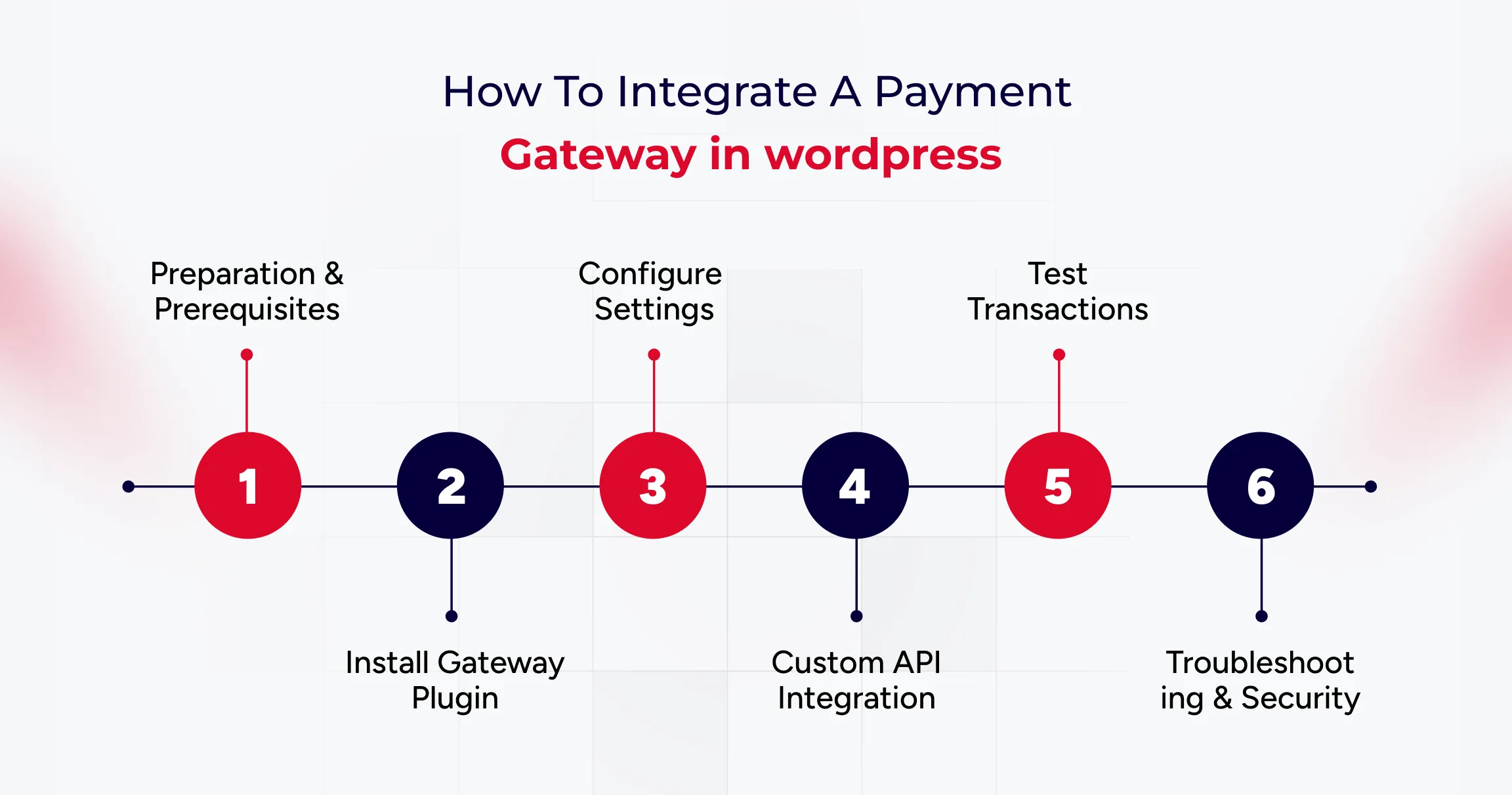
Step 1: Preparation and Prerequisites
Before installing software, you must ensure your host is secure. An active SSL certificate is mandatory, as browsers flag non-HTTPS sites as Not Secure, which undermines user trust immediately. You also need a server running PHP 7.4 or higher to support secure communication with gateway APIs.
Step 2: Installing the Gateway Plugin
Step 3: Configuring Standard Plugins
Step 4: Implementing Custom APIs
Step 5: Testing the Integration
You must switch your plugin to Sandbox mode and use dummy card numbers provided by the gateway to verify that orders transition from Pending to Processing correctly.
Step 6: Troubleshooting and Security
Common Payment Gateway Errors in WordPress and How to Fix Them
Here are some common payment gateway errors you can fix to ensure a seamless user experience.
1. Payment Declined or Failed Transactions
Transactions often fail due to mismatched API credentials or server communication timeouts, which are usually indicated by cURL Error 28. Verifying Live versus Test keys and upgrading server libraries ensures seamless connectivity between the store and the processor.
Cloud providers such as AWS utilize automated health checks to detect connection failures instantly. Adopting similar monitoring for API responses helps prevent revenue loss from silent authentication errors or server timeouts.
2. SSL or HTTPS Errors
Gateways reject connections from sites that lack valid SSL certificates or support modern TLS protocols. Ensuring the site is served over HTTPS with TLS 1.2 ensures that sensitive data remains encrypted during the handshake.
Financial institutions automatically terminate connections that do not meet encryption standards. Implementing strict SSL protocols mirrors this security posture, protecting customer data from interception.
3. Webhook Errors
Orders remaining in Pending status typically indicate that a firewall is blocking webhook callbacks. Allowing gateway IP addresses enables external services to communicate payment success statuses back to the WordPress database.
Apps like Slack rely on open channels to deliver messages instantly. Configuring firewalls to accept gateway signals ensures that order dashboards reflect actual payment statuses without manual refreshes.
4. Checkout Page Not Loading
Aggressive caching of dynamic pages often leads to broken checkout experiences or empty carts. Excluding specific endpoints, such as Cart and My Account, from the caching rules ensures that every session remains unique and functional.
Retail giants like Amazon dynamically render shopping carts to ensure inventory accuracy. Disabling cache for transactional pages prevents users from seeing outdated content and reduces cart abandonment.
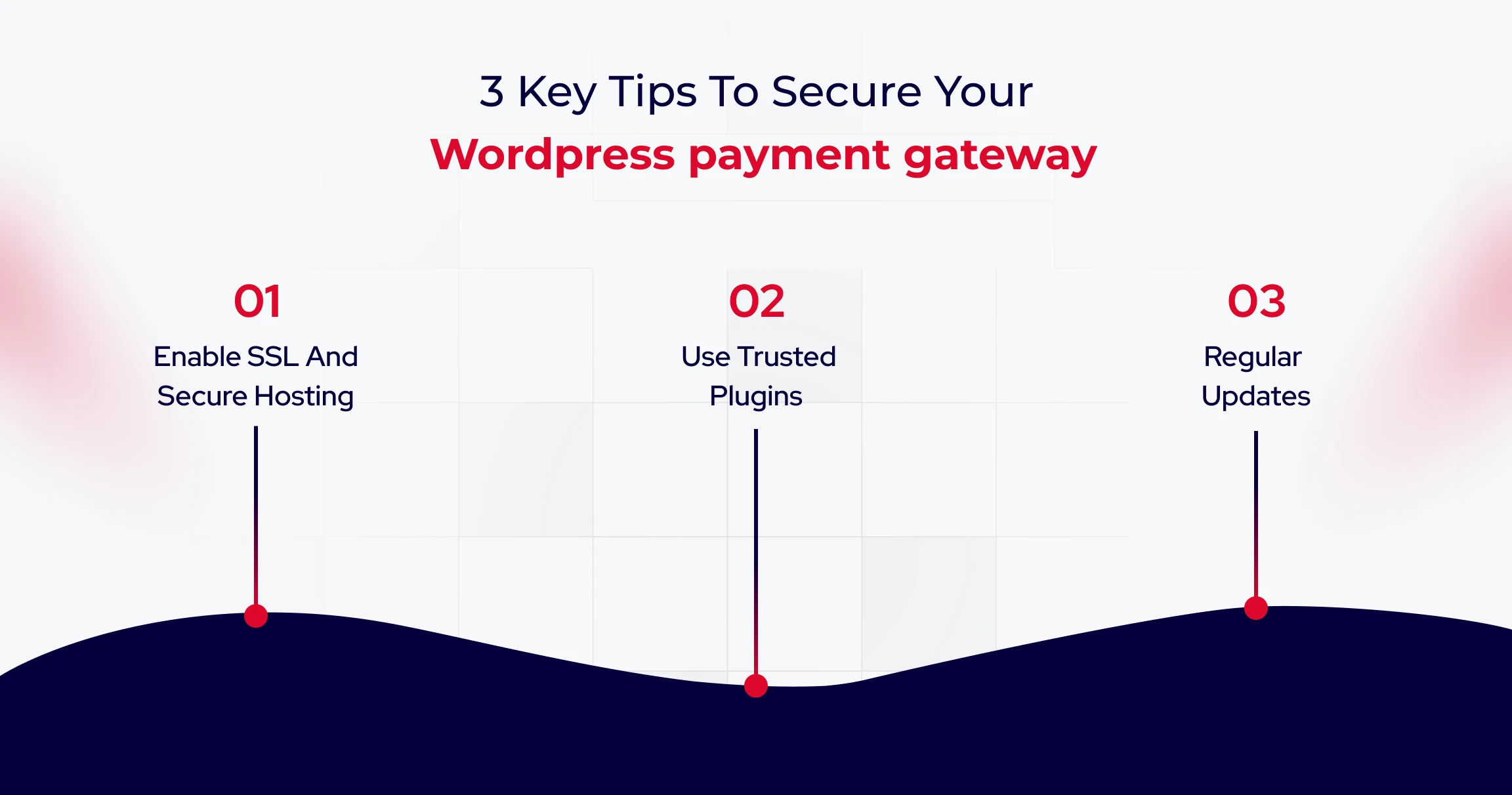
Tips to Secure Your WordPress Payment Gateway
Payment systems are not a one-time setup. Plugins, APIs, and security protocols evolve continuously, making regular updates essential. Many businesses use ongoing website maintenance services to monitor performance, apply patches, and prevent disruptions that could affect transactions or customer trust.
Here are some valuable tips to help you secure WordPress payment gateway integrations.
1. Enable SSL and Secure Hosting
An active SSL certificate is mandatory for any website handling payments. It encrypts data, ensuring that malicious actors cannot intercept sensitive information like credit card numbers.
Banks use encryption to signal safety immediately upon user arrival. You must prevent browsers from flagging your site as Not Secure, which destroys customer trust and prevents gateways from functioning.
Because payment processing involves sensitive financial data, advanced protections such as firewalls, malware scanning, and intrusion detection are critical. Companies handling significant transaction volumes often implement dedicated WordPress security services to reduce vulnerabilities and maintain compliance standards.
2. Use Trusted Plugins and Tokenization
3. Regular Updates and Two Factor Authentication
Best Practices for Optimizing Payment Experience
Here are the best practices you can use to optimize eCommerce payment experience.
1. Reduce Checkout Steps
A complicated process is the primary cause of abandonment. To maximize conversions, you must minimize the number of form fields and implement Guest Checkout to reduce friction. Major retailers removed the requirement to create an account to speed up transactions. You can capture more revenue by allowing users to purchase without the hassle of registration.
2. Offer that lacks Payment Options.
3. Mobile Friendly Design
Your checkout experience must be fully responsive. Elements should automatically adapt to smaller screens, ensuring that input fields are large enough to tap easily. Mobile-first platforms prioritize touch-friendly interfaces to keep users engaged. You should use express payment buttons to enable one-tap purchases without entering card numbers.
As eCommerce continues to evolve, payment systems are no longer just technical components but critical business infrastructure that directly influences trust, conversion rates, and long-term customer retention.

Wrapping Up
Integrating a payment gateway in WordPress isn’t a technical checkbox. It’s a revenue decision that compounds with every transaction. The difference between payment systems that enable growth and those that constrain it isn’t the gateway you choose, but how you architect the integration.
Successful implementations treat payments as core infrastructure: prioritize SSL encryption, enforce tokenization, configure webhooks for real-time updates, and test rigorously before going live. Every day your payment architecture introduces friction is a day where competitors with seamless checkouts capture customers who started their journey on your site.
Start by auditing your current integration against the security and performance benchmarks outlined in this guide, then optimize systematically to transform checkout from a necessary evil into a competitive advantage.